
Here at 79mplus we are some developers working on some awesome custom plugin solutions that will blow your mind! From Digitally signing contract pages right from your browsers with touchscreens, to managing virtual users that can post to multiple instances of WordPress with a single click – you would be amazed to see what we do as part of our work.
With a client we faced, we had to deal with a weird issue. The website was using the Booked plugin from the good fellows of Boxy Studio. It is a plugin that lets you create a calendar on your website that then can let users book certain dates for appointments that the website was configured to take.
This is great for people who provide services based on tight schedule in specific days, such as, musical bands, contractual lecturers or maybe even a plumbing service.
Table of Contents
The Issue
The client was describing this issue that seemed to be strange to us at first. He stated that on the calendar on their website, if someone books a date for All day, then the current day is unavailable, which is fine. But the problem is, the previous day is also unavailable for some strange reason.
We wanted to make sure that it is not our fault, so we tested only the Booked plugin in a blank WordPress installation. But the issue persisted. So, the problem is not with any of our custom plugin solutions that we designed for this website.
To simulate the same problem on an isolated environment, in a blank WordPress installation we have installed the Booked plugin:

The WordPress version was 4.6.1 and the plugin version was 1.5.7.
Then we created a calendar to keep our appointments, from Appointments – Calendars.

Then we go to Appointments – Settings – Default Timeslots, Select our calendar “Mycal” from the dropdown list. A blank timeslot list awaits us.
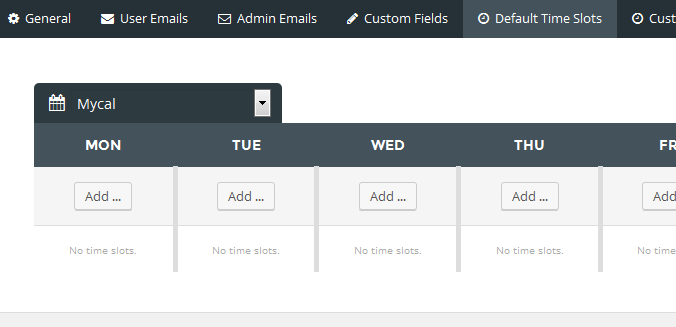
We click Add… under MON, then a popup setting opens under that day. We select All day time slot option to ensure that we have at least one All time timeslot that we can test in this scenario. Then we click Add and then OK.
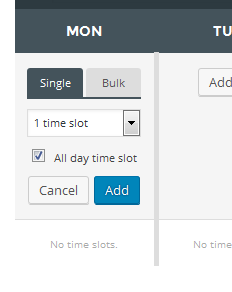
An All day timeslot has been created. So, just for a test, we also create a normal timeslot having a range of time, which is not All day. So we click Add… again and create a time slot like below:
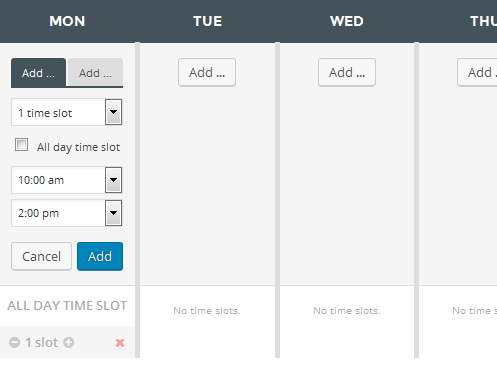
Our client had many more slots like this. But let’s keep it simple – let’s just have one slot.
We did this for Monday. We have to do it for other days as well, or at least for 3 consecutive days just for the testing. We want to test one appointment day and days before and after it.

Now we need to show it in our website’s frontend, so that users can use it. While still in the Settings section, click on the Shortcodes tab. You will see some shortcodes under a section titled “Display a Custom Calendar”:

I had other experiments before. But don’t mind, just copy the code under Mycal. Your code must be something like:
[booked-calendar calendar=2]
Now, we create a new page and paste the code in it:
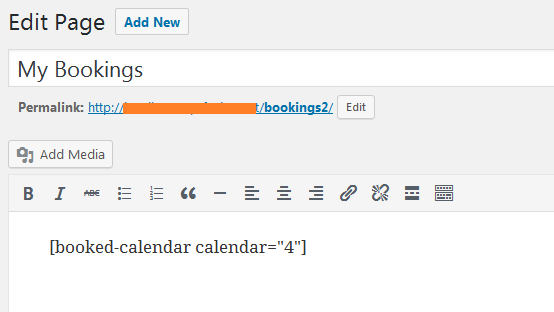
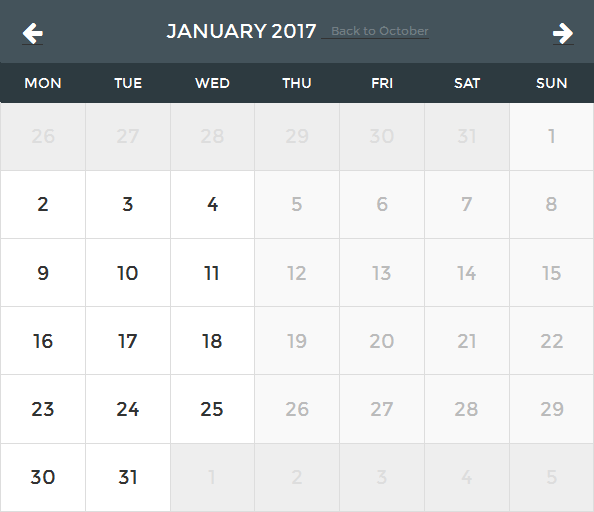
Now, we visit the page and go to a desired month. The months that have passed away are not bookable and the dates are disabled. So, I always skip a month or two ahead for the test. Let’s say I have chosen January 2017.
We select a date from Tuesday. Say, date 10. We get options to book available dates, as they pop up in the screen.

We click the “Book Appointment” button next to All day, and finish the booking. Now we see what is expected.
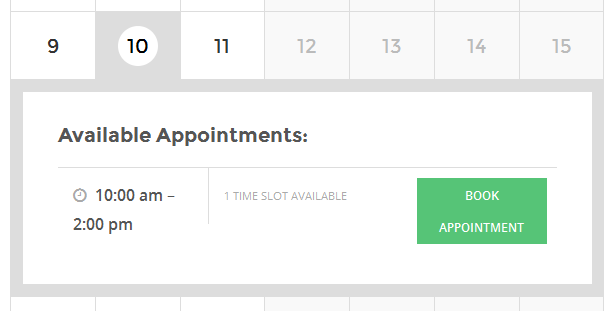
The all day option is gone, because we have booked the All day option for that day. This is working fine. But wait till you click on the day before, the date 9, in our case.
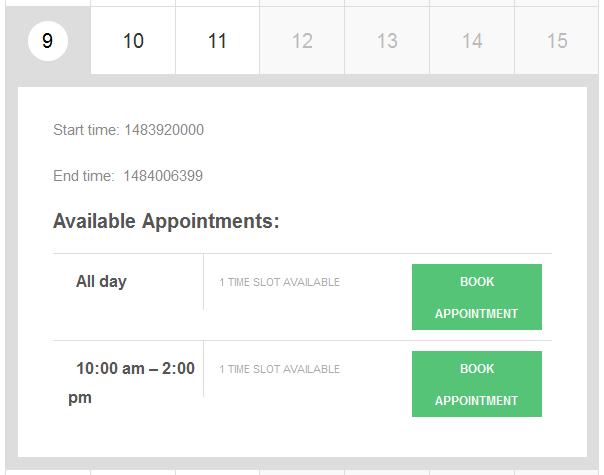
Whoa!! What just happened?!
The All day option just disappeared! Although we booked All day, for the next day, we don’t have All day for the day before? What gives?
(By the way, date 11 was just fine, showing the All day appointment option.)
The Investigation
We have gone through the leaps and bounds to find out what our fault was. It turns out there was none. At least to our knowledge, we have configured the plugin correctly and used the feature set within the ability of the plugin.
So, the problem should be in the code of the plugin. That’s why we tried to add bebug lines (actually some test print_r or echo lines) to find out what data was going where and how it was being processed.
At last we found out, the problem is with how the timestamp meta is searched through the WP_Query call in the file wp-content/plugins/booked/includes/functions.php in line 261.
The Background
Mostly, everything that can be added or removed through the panel in WordPress is called a “post” (only internally). You can go to the wp_posts table to check out this fact.

Everything, even a “page” is stored in the table wp_posts, not in a table named wp_pages. The appointments booked in the calendar is also stored in the wp_posts table.

And if we have some extra data that we want to attach to it, it is stored in the wp_postmeta. Mind that in the above screenshot we have the appointment’s id as 40. And in the postmeta table we have all the meta associated with this particular booking with id 40.

Here,
The _appointment_timestamp is the starting time of the appointment stored in an integer form
The _appointment_timeslot holds the start and end time in 24 hours format. We know that in 24-hours format the hours are counted as 0, 1, 2, 3, 4… 12, 13, 14,… 23, 24. In our data, 0000 means 00:00 which translates to 12:00am in 12 hour format. 2400 means 24:00 which represents the last minute of a day. As this is an All day event, it starts from the beginning minute of a day and ends at the last minute of the day.
The timestamp can be generated through php mktime() function. The syntax is something like this:
int mktime ([ int $hour = date(“H”) [, int $minute = date(“i”) [, int $second = date(“s”) [, int $month = date(“n”) [, int $day = date(“j”) [, int $year = date(“Y”) [, int $is_dst = -1 ]]]]]]] )
You would notice that it returns an integer value. What it does is that it takes a time and converts the time into a number, which can be later decoded through date() function. Every second, minute, hour in this universe can be encoded into a number through this function.
Just to test how it works, let me show you a code:
https://gist.github.com/adnan360/c763046424f9fde0609bbe54e8ef565f
This code prints the value mktime() then takes a 1 second break and then prints again. You would notice that it prints something like this (your output would be different since you are going to run it in a different date and a different time):
1477541172
1477541173
1477541174
1477541175
1477541176
Notice that the last part of the value is changing. It is increasing by 1 each second. Like this, all the time in the world, every minute, every second can be expressed as a single integer. An integer is easier to store and great for searching for range of times.
For example, you can search all the records from 1477541172 to 1477541176 and you will get the above 5 records! In a database other than WordPress, a field of INT(11) is just great for storing the time in a compact form. You will find many other popular php codes use this to get around managing date and time.
The Testing
The problem in our case, is that it includes the next day as today when it is showing the available appointments. You can check these lines (around line 236-247 in booked/includes/functions.php):
https://gist.github.com/adnan360/1f32ec9f69b8426a92d83c1b5027393e
You can see there is a range that is being sent. Sent to where? The whole $args array is sent to a WP_Query in around line 261:
https://gist.github.com/adnan360/fb360566f1f9992f6e0ccfa1ddf8b4cb
After this line, we added these lines to test if the range checking is correct:
https://gist.github.com/adnan360/2d842f0c3cf8cb2ef78434de8bcbfc85
So, we now can select the date 10, and we would see something like this:

Remember that the date 10 appointment that we had in our database had a timestamp of 1484006400. It ends in 6400 and the range checking is starting to look from 6399. So, already it is wrong. If we are at date 10 the range check should start from 6400, as our database value states.
What if we select date 9? Let’s test it.

Date 9 is checking records upto 6400 which should not happen. It is bringing in record of date 10 into date 9, just because the range is just one second here and there. That’s why you cannot see an All day appointment available for booking in the date 9, as it is thinking that we have an All day appointment today. (But actually we don’t.)
So, we know that the start range is wrong (first screenshot) and the end range is wrong too (second screenshot).
We, along with our boss were astonished with what was printing and we needed to fix this ASAP.
The Initial Fix
Just to test if our doubts were true, we modified the two lines which generated the range values. We had these lines (line 225-226):
https://gist.github.com/adnan360/f65d180ae431b045fbd18661853d8466
We changed them to:
https://gist.github.com/adnan360/da1e0d0fb46f7b35f09983f182efca2d
And it worked!
Date 10 is not showing the All day booking as expected:
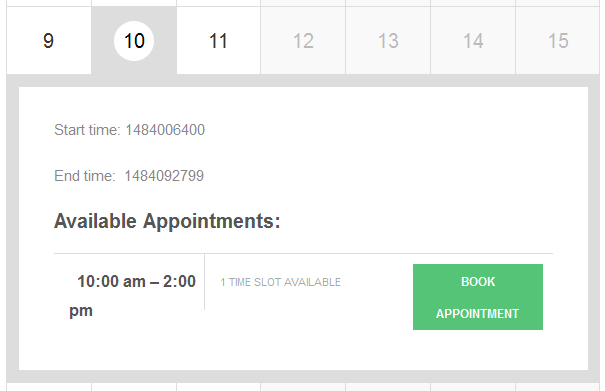
(Notice that the range is also right, starting from 6400)
Date 9 is not booked for All day, so it is showing the All day option available for booking, just as it should:

(Notice that the end range ends with 6399 and not 6400 which keeps the appointments from next day out of the current date.)
The Final Fix
So, we found out the problem and fixed it. But editing the source of a plugin is not a good idea. So, with the help of my boss we made a plugin that takes advantage of the apply_filter() call in the line 261. The plugin had other lines as well, but the gist of it is following:
https://gist.github.com/adnan360/86f507347a1ce72b8a55055b7fb947e1
When applying the plugin, we also restored the original lines in the booked/includes/functions.php file.
The Last Words
As we have presented the evidence here, the problem exists in the Booked plugin – that is for sure. We are thankful to the plugin authors for making such an wonderful plugin. We are thinking of contacting the plugin authors about this little trouble we had with the plugin. We would love to hear from the plugin authors regarding this issue.
But here at 79mplus, the adventure continues.
Conquering the next challenges everyday.